
Server configuration refers to the process of setting up a server to perform specific tasks or functions. A server can be a physical device or a virtual machine that runs server software to manage resources and provide services to client devices. In this article, we will discuss the basics of server configuration and some best practices to ensure optimal performance and security.

Server Operating System The first step in server configuration is to choose an appropriate operating system (OS) for your server. Popular server OS options include Linux, Windows Server, and macOS Server. Linux is the most popular choice due to its stability, security, and open-source nature, which allows for extensive customization. Windows Server is often chosen for compatibility with Microsoft products and ease of use, while macOS Server is popular among Apple users for its integration with the Apple ecosystem.
Server Hardware After selecting an operating system, the next step is to choose the right hardware for your server. This includes choosing the appropriate CPU, RAM, storage, and network interface cards (NICs) based on your requirements. You should consider factors such as the number of users, the type of applications you plan to run, and the amount of data you need to store.
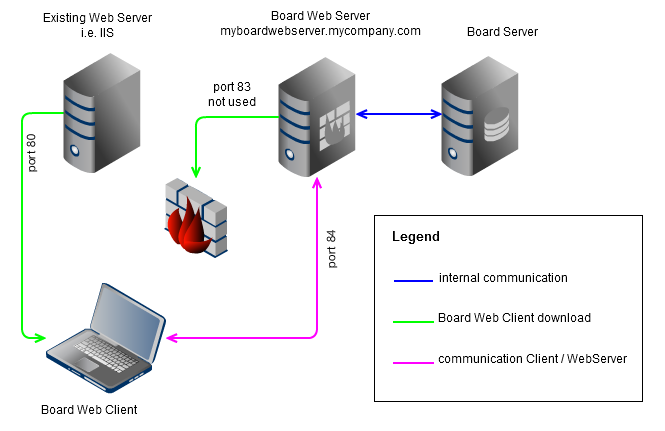
Server Security Server security is a critical component of server configuration. You should take measures to protect your server from unauthorized access, malware, and other threats. This includes setting up firewalls, implementing access control lists, and configuring encryption protocols such as HTTPS and SSL. It is also recommended to install anti-virus software, regularly update software and firmware, and create backups of your data to ensure it is not lost in case of a security breach.
Server Applications Once your server is set up and secured, you can start installing and configuring applications. This includes setting up databases, web servers, email servers, and other applications as required. You should ensure that your applications are up to date and properly configured to ensure optimal performance and security.
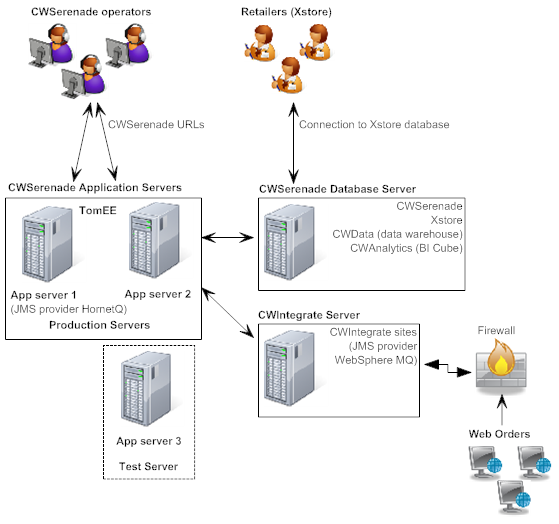
Server Monitoring Finally, it is essential to monitor your server to ensure it is performing as expected. You can use various monitoring tools to track CPU usage, RAM usage, network traffic, and other metrics. Monitoring helps you detect and troubleshoot issues before they cause significant problems.
In conclusion, the server configuration is a complex process that involves choosing the right hardware, operating system, and applications, securing your server, and monitoring its performance. By following best practices, you can ensure that your server is reliable, secure, and performs optimally. Remember to stay up to date with the latest security patches and updates to keep your server protected from emerging threats.



Leave a Reply