

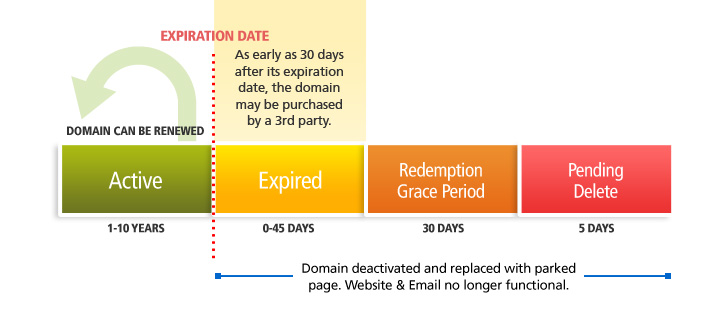
When you register a domain name, you are essentially leasing the right to use that domain for a specified period of time, typically one year. If you fail to renew the domain before the expiration date, the domain will expire, and you will lose the right to use that domain. In this article, we will discuss the consequences of domain expiration, the reasons why domains expire, and what steps you can take to prevent your domain from expiring.
Consequences of Domain Expiration:
When a domain expires, several consequences can occur, including:
- Loss of the domain: If you fail to renew the domain before the expiration date, you will lose the right to use that domain, and it may become available for registration by someone else.
- Website downtime: If your website is hosted on the expired domain, it will go offline, resulting in downtime and potentially lost revenue.
- Email disruptions: If you use the expired domain for email, you may experience disruptions in email service, leading to missed messages and potential business interruptions.
- Brand damage: Losing control of your domain can also result in damage to your brand’s reputation and online presence.
Reasons Why Domains Expire:
Domains can expire for several reasons, including:
- Failure to renew: The most common reason for domain expiration is a failure to renew the domain registration before the expiration date.
- Expired payment information: If your payment information is outdated or invalid, the registrar may be unable to process the renewal payment, resulting in a domain expiration.
- Registrar errors: In rare cases, errors made by the registrar can result in a domain expiration.
- Domain disputes: In some cases, legal disputes or conflicts over ownership of a domain can result in a domain expiration.
Steps to Prevent Domain Expiration:
To prevent your domain from expiring, follow these steps:
- Set up auto-renewal: Most registrars offer the option to set up auto-renewal, which will automatically renew the domain registration before the expiration date.
- Monitor expiration dates: Make sure to monitor the expiration date of your domain and set reminders well in advance of the expiration date.
- Update payment information: Keep your payment information up to date and ensure that your registrar has valid and current payment information on file.
- Register the domain for a longer period: Consider registering the domain for a longer period, such as two or three years, to reduce the risk of forgetting to renew.
- Back up your website: To prevent website downtime, back up your website regularly and ensure that you have a plan in place in case of a domain expiration.
Conclusion:
Domain expiration can have significant consequences for your online presence and business. To prevent your domain from expiring, set up auto-renewal, monitor expiration dates, keep payment information up to date, register the domain for a longer period, and back up your website. By taking these steps, you can ensure that your domain remains active and avoid the risk of losing the right to use that domain.



Leave a Reply